
Ending the process now in Windows 10
You have to just go a step ahead in ending a process in windows 10 taskbar. Just open task manager by pressing CTRL + Shift + Esc .
You can also open task manager by pressing windows key + x and then choosing Task manager from the menu.
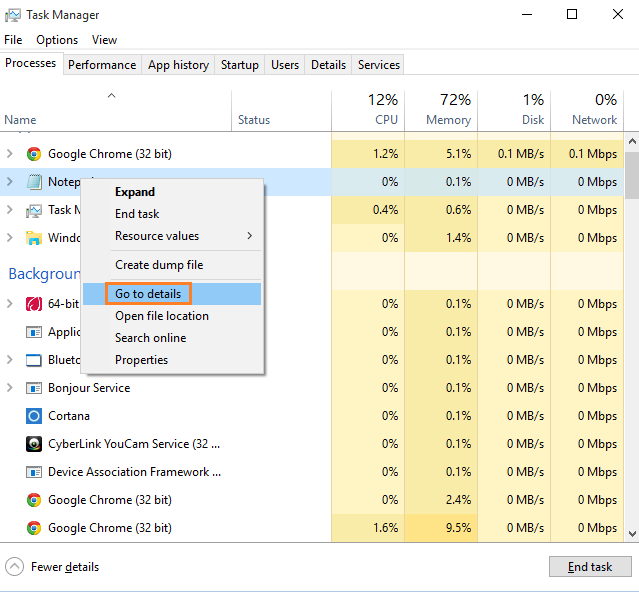
Once you locate the process which you want to kill, just right click and in the menu which opens, click on Go to details.
Once you reach details window, just right click on the process and click on End process tree.
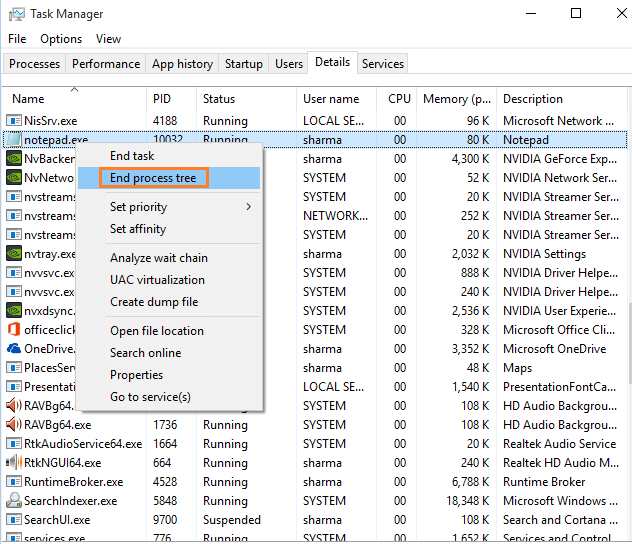
In this way you can end the process tree.
Note that end process tree has same effect as end process. It also kills any sub process attached with the process and helps you to get rid of the process which has get stuck. Once the process is killed, and you reboot the window, it starts again with no glitch at all.
Comments
0 comments
Article is closed for comments.